Access Tokens
Manage token usage
|
|
Item bank managers can view and manage token usage for project managers who are assigned to projects within their item bank. In the Token usage section of the Access token page, they will see a list of project managers who have generated a token. From this list, they can deactivate, lock, or unlock tokens.  The Location column shows the token usage location as a two-digit country code, for example, “US”. If the location cannot be retrieved, "Unavailable" is shown.
Deactivate user tokens
|
|
- From the Access Token page in the Token usage section, select specific users in the list, or select the top-left checkbox to select all.
- Click the
 and select Deactivate.
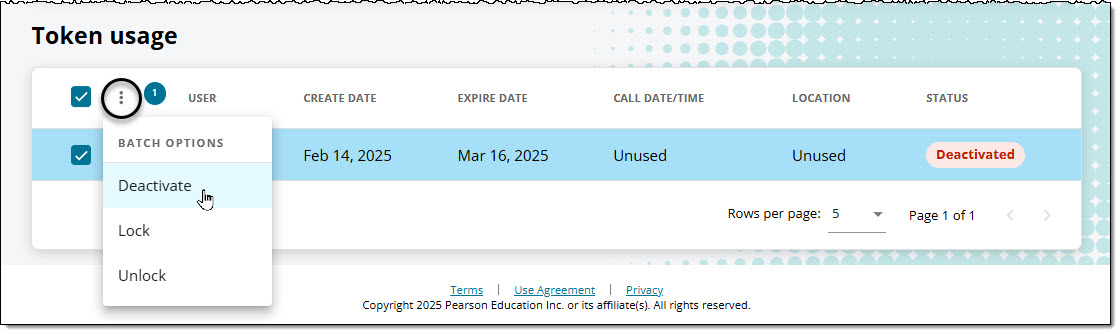
- The token status will be "Deactivated" until the user generates a new token.
Lock and unlock user tokens
|
|

- From the Access Token page in the Token usage section, select specific users in the list, or select the top-left checkbox to select all.
- Click the and select Lock.
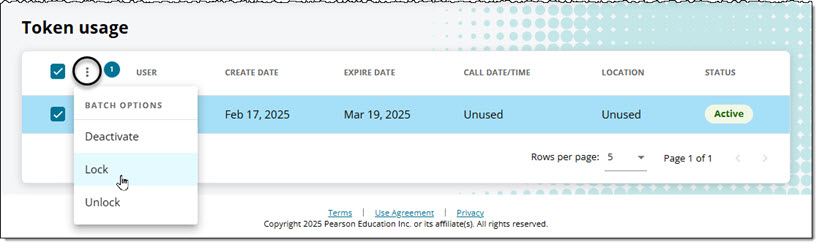
- The token status will be "Locked" and the associated user will not be able to use the token to refresh project data in any external spreadsheets or dashboards.
- To unlock the token, select the user or users in the list.
- Click the and select Unlock.
- The token status will be "Active" until it expires or is deactivated or locked.